
There are three CEILING functions in Excel. CEILING, CEILING.MATHS, and CEILING.PRECISE.(Although this one won’t show up if you start typing it in like the others will. You have to type the whole thing!)
They are all similar but work differently in certain circumstances. CEILING and CEILING.PRECISE are older functions, so unless you need your spreadsheet to work in an older version of Excel, then best to stick to CEILING.MATHS
These functions all work in a similar way to MROUND, which you can read about here. The difference is that MROUND will round up OR down, depending on the number, where the CEILING functions will always round up, BUT with negative numbers it depends on what you mean by up! It is all a little bit confusing at times.
We will focus on the newer function but if you want explanations of the older function you can read about that –here(CEILING), here(CEILING), or here(CEILING.PRECISE).
=CEILING.MATH(number, [significance], [mode])
So, three inputs, only one of which is required. (Square brackets [ ] means optional in Excel function descriptions)
number – the number that you want to round, examples, 52, 395, 4.1 etc.
significance – By default, significance is +1 for positive numbers and -1 for negative numbers. If you put something else, then this will be the number of significant digits after the decimal point to which number is to be rounded.
mode – This controls whether negative numbers are rounded toward or away from zero. It has no impact if the number input is positive.
Some examples might help to clear up what all this actually means.
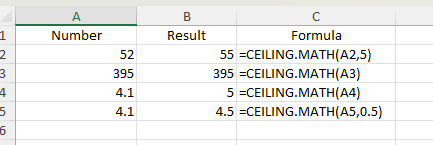
In the first example, because we have entered 5 for the second input (significance) the number is rounded up to the nearest multiple of 5. In the second example, we have not entered anything into the second input, so the number ‘is rounded up to the nearest whole number’, which means it doesn’t change. The third example, is also rounded up to the nearest whole number, so it does change. And last example, you can also enter decimal numbers for the significance input, and the number will be rounded up to that.
By default, negative decimals numbers are rounded towards zero. When mode is 1 or TRUE, CEILING.MATH rounds negative numbers away from zero.