
When you type in a two digit year as part of a date in a spreadsheet, by default, the spreadsheet will turn it into a four digit year. This is very helpful behaviour, until it isn’t. If you have dates that are very far in the past, or the future, the default behaviour may not get your dates correct.
You see, the spreadsheet has to work out what century you are in. If you enter a date and you want the current year, then putting the current century also works. Next year, last year, 10 years time, all this century, so no problem. But what you if put 1/1/50, do you mean 1950 or 2050? How is a spreadsheet to decide?
Turns out there is a setting that determines where the cut off point is, so that you can know what will happen, and change the behaviour if required.
On windows machines, if you don’t change anything, it is set up 2049, so 49 will change to 2049 and 50 will change to 1950.
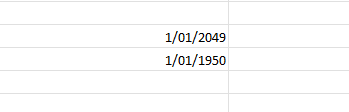
If you have an older version of Excel, this might be different. It would be worth testing as for a long time the cut off was 29, which isn’t that far away anymore!
To make the change to the default, it isn’t actually an Excel setting, but a windows setting.
To change the century cutoff date, follow these steps if your computer is running Windows 11:
- Select Start, enter control panel and then press Enter.
- In the Search box, enter date, and then select Change date, time, or number formats.
- In the Region dialog, select Additional settings.
- In the Customize Format dialog, select the Date tab.
- In the When a two digit year is entered, interpret a year between setting, type the cutoff year that you want, and then select OK.
Google sheets still has the cut off as 2029, so 1/1/30 changes to 1/1/1930!
To change this google says:
- Go to File > Settings (or Spreadsheet settings).
- Under the General tab, look at the Locale setting.
- Changing your locale changes the default date parsing and century assumptions for ambiguous short dates.
- Click Save settings.
It doesn’t actually tell you which locales are using which cut off, which is pretty useless, and there is NO NEW ZEALAND! Come on google, we exist!
Obviously, it is best to enter four digit years to avoid any of these issues!